
# การแสดงผลแบบ Outstream ด้วย iframe
การแสดงผลแบบ Outstream ด้วย OutStream SDK ทำให้ Video Player ลอยและย่อขยายอัตโนมัติเมื่อผู้ชมเลื่อนหน้าเว็บ มีขั้นตอนดังนี้
# 1. เพิ่ม container สำหรับ Outstream
เพิ่มแท็ก <div> ในจุดที่ต้องการแสดงผลวิดีโอแบบ Outstream พร้อมระบุแอตทริบิวต์ id ซึ่งจะใช้อ้างอิงในขั้นตอนถัดไป
<div id="outstream-container"></div>
1
# 2. เพิ่ม ByteArk OutStream SDK
เพิ่ม ByteArk OutStream SDK ที่แท็ก <script> ใน HTML
<script src="https://byteark-sdk.cdn.byteark.com/outstream/@latest/byteark-outstream-sdk.min.js"></script>
1
# 3. เปิดใช้งาน OutStream SDK
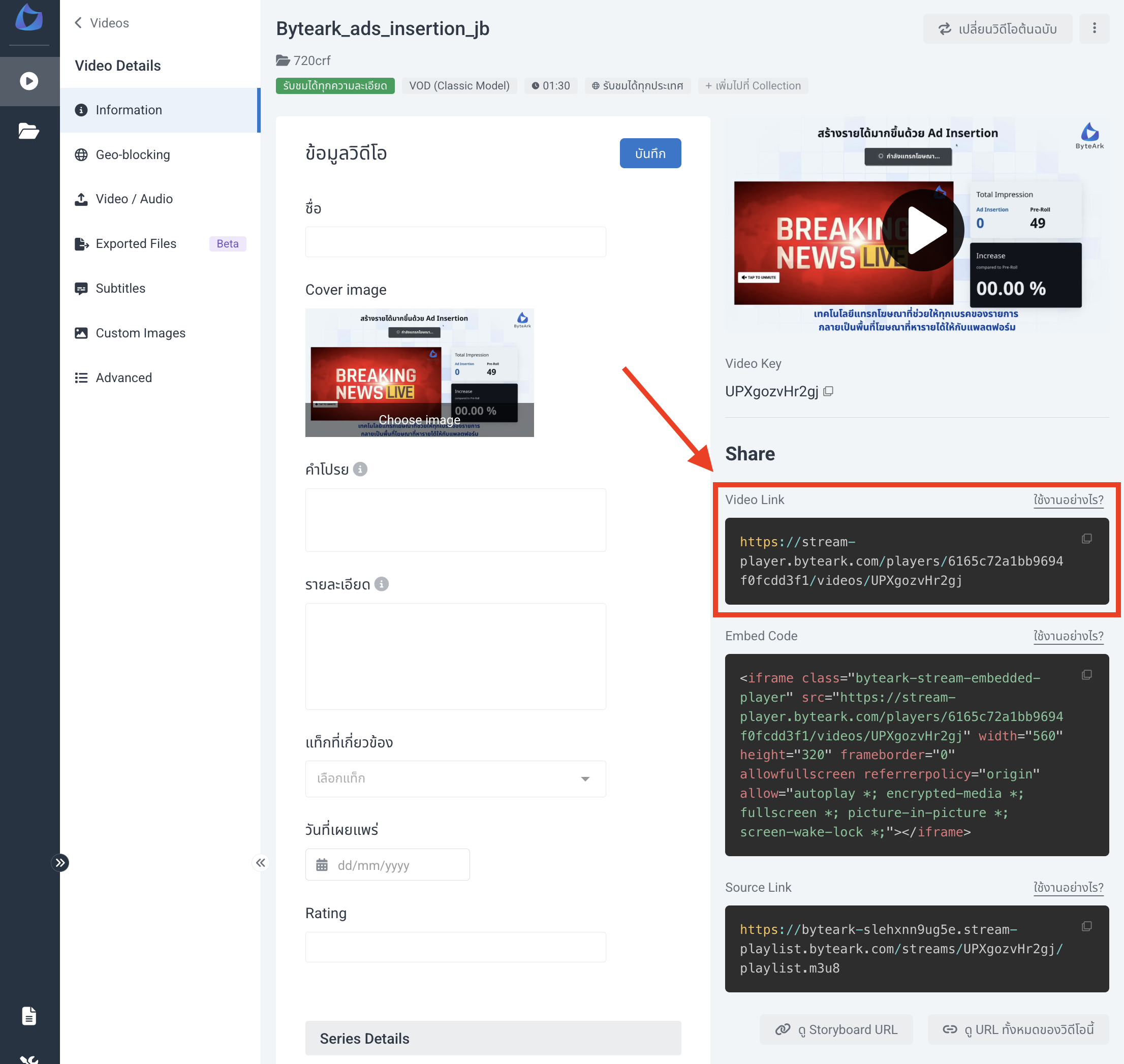
เพิ่มโค้ดเพื่อเปิดใช้งาน OutStream SDK กับแท็ก <div> ที่สร้างไว้ในขั้นตอนที่ 1 และระบุ contentUrl ที่ต้องการเล่น โดย contentUrl หาได้จากหน้า Video Detail บน ByteArk Stream ในหัวข้อ Video Link
<script>
  var sdk = new window.ByteArkOutStreamSDK({
    elementId: 'outstream-container', // ID of the element to make float (required)
    contentUrl: 'https://stream-player.byteark.com/players/614d5df44a9a7e00b4dc3eb6/videos/U686mpQ72zCw', // URL for iframe src
    // position: 'bottom-left', // 'bottom-left' or 'bottom-right' (default: 'bottom-right')
    // animation: true, // Enable smooth transitions (default: true)
  });
</script>
1
2
3
4
5
6
7
8
2
3
4
5
6
7
8
# การปรับตั้งค่า Options ของ OutStream SDK
| Name | Type | Default | Required | Description |
|---|---|---|---|---|
elementId | String | - | Yes | ID ของ HTML Element container |
contentUrl | String | - | No | URL ของ iframe video player จาก ByteArk Stream |
position | String | bottom-right | No | ตำแหน่งเมื่อย่อ container ระหว่างเลื่อนหน้าเว็บ ระบุเป็น bottom-left หรือ bottom-right |
animation | Boolean | true | No | แสดง animation เมื่อย่อ container |
# ตัวอย่างซอร์สโค้ด
<!doctype html>
<html>
  <head>
    <meta charset="utf-8">
  </head>
  <body>
    <!-- Create an outstream container div -->
    <div id="outstream-container"></div>
    <!-- include ByteArk OutStream SDK -->
    <script src="https://byteark-sdk.cdn.byteark.com/outstream/@latest/byteark-outstream-sdk.min.js"></script>
    <script>
      // init ByteArk OutStream SDK
      var sdk = new window.ByteArkOutStreamSDK({
        elementId: 'outstream-container', // ID of the element to make float (required)
        contentUrl: 'https://stream-player.byteark.com/players/614d5df44a9a7e00b4dc3eb6/videos/U686mpQ72zCw', // URL for iframe src
        // position: 'bottom-left', // 'bottom-left' or 'bottom-right' (default: 'bottom-right')
        // animation: true, // Enable smooth transitions (default: true)
      });
    </script>
  </body>
</html>
1
2
3
4
5
6
7
8
9
10
11
12
13
14
15
16
17
18
19
20
21
22
2
3
4
5
6
7
8
9
10
11
12
13
14
15
16
17
18
19
20
21
22