
# Context Menu
Note
This feature is available only to ByteArk Video Cloud for Business customers. Please contact sales@byteark.com if you would like to use it.
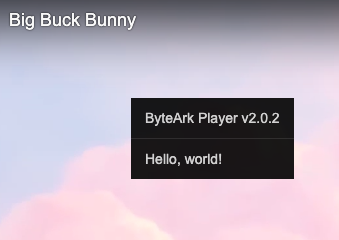
ByteArk Player lets you add a custom menu that appears when the viewer right-clicks on the player, with custom behavior on each menu item. Configure via the menu option.
# Context Menu display
# Options
| Name | Type | Required | Description |
|---|---|---|---|
| menu | Array | No | List of context menu items |
| menu[].label | String | Yes | Label shown in the menu |
| menu[].listener | Function | Yes | Function called when the item is clicked |
# Example
<!doctype html>
<html>
  <head>
    <meta charset="utf-8">
  </head>
  <body>
    <div id="video-player"></div>
    <script src="https://byteark-sdk.cdn.byteark.com/player/v2/byteark-player.min.js"></script>
    <script>
      var player = bytearkPlayer('video-player', {
        fluid: true,
        menu: [
          { label: 'Visit website', listener: function() { window.open('https://www.byteark.com'); } },
          { label: 'About', listener: function() { alert('Big Buck Bunny'); } },
        ],
        sources: [{
          title: 'Big Buck Bunny',
          src: 'https://byteark-playertzxedwv.stream-playlist.byteark.com/streams/TZyZheqEJUwC/playlist.m3u8',
          type: 'application/x-mpegURL'
        }]
      });
    </script>
  </body>
</html>
1
2
3
4
5
6
7
8
9
10
11
12
13
14
15
16
17
18
19
20
21
22
23
24
2
3
4
5
6
7
8
9
10
11
12
13
14
15
16
17
18
19
20
21
22
23
24