
# Playback Speed
ByteArk Player can let viewers change the playback speed by setting playbackRates in options. A speed menu appears when the viewer opens the Settings menu.
Caution
The speed menu only appears on browsers and devices that support speed control. If the browser or device does not support it, the menu will be hidden.
# Playback Speed display
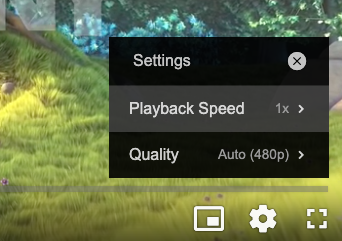
# Options
| Name | Type | Required | Description |
|---|---|---|---|
| playbackRates | Array | No | List of speeds offered to viewers (multiplier) |
# Example
<!doctype html>
<html>
  <head>
    <meta charset="utf-8">
  </head>
  <body>
    <div id="video-player"></div>
    <script src="https://byteark-sdk.cdn.byteark.com/player/v2/byteark-player.min.js"></script>
    <script>
      var player = bytearkPlayer('video-player', {
        fluid: true,
        playbackRates: [0.5, 1, 1.5, 2],
        sources: [{
          title: 'Big Buck Bunny',
          src: 'https://byteark-playertzxedwv.stream-playlist.byteark.com/streams/TZyZheqEJUwC/playlist.m3u8',
          type: 'application/x-mpegURL'
        }]
      });
    </script>
  </body>
</html>
1
2
3
4
5
6
7
8
9
10
11
12
13
14
15
16
17
18
19
20
21
2
3
4
5
6
7
8
9
10
11
12
13
14
15
16
17
18
19
20
21