
# ByteArk AdStream
ByteArk AdStream lets you publish your videos on your website while earning revenue from Preroll/Midroll/Postroll video ads, with no restrictions on display format or ad source. It is ideal for news or content websites with large audiences that already have video, giving your site a quality space for both video playback and ad display.
Using AdStream involves two sides: the content manager, who uploads videos and configures ads through the console, and the developer, who embeds the videos on the website with code. This guide keeps the two sides clearly separated so each team can get started in the right place.
Request access
If you don't have an account yet, contact the ByteArk team to enable ByteArk AdStream at sales@byteark.com
# How It Works
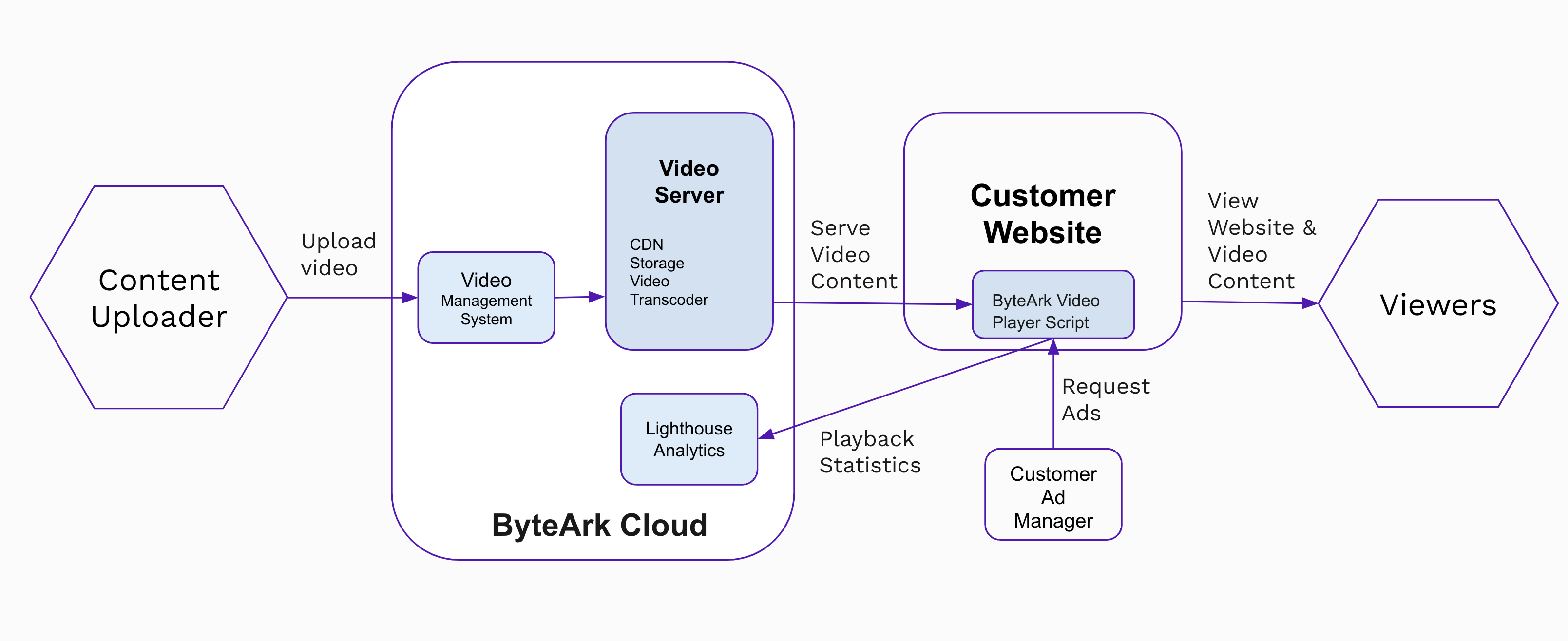
ByteArk Cloud stores and serves your video streams to your website. A content manager uploads videos to the system and places the resulting embed code on the website. When a viewer plays a video, the Player sends an Ad Request to Google Ad Manager (or any VAST-compliant ad system) and counts the Ad Impressions that generate revenue.
# Instream vs Outstream
AdStream supports two display formats. Choose the one that fits the space on your website.
| Instream | Outstream | |
|---|---|---|
| Definition | Video and ads play inside a Video Player embedded with the content | A Video Player that floats and resizes automatically as the viewer scrolls |
| Behavior | Stays in the position where it is embedded | Floats to a screen corner (bottom-left / bottom-right) while scrolling |
| Embed methods | iframe or HTML/JavaScript | iframe or HTML/JavaScript (via the OutStream SDK) |
| Best for | Pages where video is the main element | In-article areas where playback should continue while reading |
# Glossary
| Term | Meaning |
|---|---|
| VAST | The Ad Tag standard for video ads, supported by Google Ad Manager and other ad systems |
| Ad Tag URL | The URL of a VAST-compliant ad tag, configured so the Player can request ads |
| Preroll / Midroll / Postroll | Ad playback positions: before / during / after the main video |
| Ad Request | The number of times the Player requests an ad per video playback |
| Ad Impression | The number of times an ad is actually displayed; the primary metric used for billing |
| Ad Complete | The number of times a viewer watches an ad to the end |